

Once new starters begin an onboarding course, between 86% and 99% of them finish it. That’s what our analysis of 28 customer learning platforms shows. The sticking point comes earlier: not everyone gets started. That’s exactly where automation helps. Here are three moments you can automate, so every course is ready the moment a new starter needs it.
Noor's second week
Noor starts at the shop on a Monday. Her first day is planned down to the last detail. Her rota is right, her name badge is waiting and her colleagues know who she is.
Then week two begins.
Her buddy is by her side, answering all her questions. Her manager books a quick catch-up for the end of the week. The course on returns, however, isn’t until week three. That’s how the schedule works for every new starter.
On Thursday, a shopper comes to the till with a coat and no receipt. Her buddy has the day off. Noor sorts it out, going on gut feeling. Everyone did what was expected of them. The course on tricky returns simply came a week too late for Noor.
Why timing matters
We compared onboarding across 28 client platforms. Short, clearly defined steps score highest. A first working day with five short modules reaches 95.1% completion among almost 500 new starters. The further a step sits from the start date, the harder it is to keep people on board. That’s why it pays to get the first weeks exactly right.
Want to know why those first weeks matter so much? Read our blog on the TinQtafel.
A good plan for the first month is step one. Step two is making sure each part of that plan happens at the right moment. In a busy shop, that’s often where it goes wrong.
Three moments you shouldn't leave to chance
1. The first days: everything’s ready
On the start date, the welcome module opens. It covers the practical things: how the till works, where to find the coffee, who to call when you’re ill. Nobody has to remember to set it up.
At one client where everything is ready on the start date, 84% of new starters log in for the first time within a week.
2. Week two: a nudge for the buddy
After seven days, the buddy gets a message: “Noor’s been here a week. Time for a coffee?” If Noor hasn’t started an important course yet, her manager gets a nudge too.
3. After each completed step: a look at what’s next
When Noor finishes the returns course, she earns a badge and her next step is ready straight away. So even in her first month, she can see where she could go next.
A route for every role
A sales assistant needs something different in week one from a delivery driver or a store manager. Give everyone the same programme and half the content arrives at the wrong time.
Picnic links onboarding to a single role and assigns it on the first working day. There, one module reaches 86.1% completion among more than 12,000 employees.
So set up those fixed moments for each group. In week two, the sales assistant gets the course on returns, while the delivery driver gets the one on safe driving. Everyone follows their own route, and nobody has to keep track of who gets what, and when.
'Sounds good, but setting it up feels daunting'
You set up those three moments with an automation: a fixed rule in your learning environment. If this happens, do that. Has Noor been here for seven days? Then her buddy gets a nudge.
Plenty of L&D professionals know exactly what they want. It’s the set-up that feels technical. When should the automation start? Which group does it apply to? And what if you get something wrong?
Die puzzel hoef je in het TinQwise-platform niet zelf te leggen.
On the TinQwise platform, you don’t have to solve that puzzle yourself. Studio Agent, the AI assistant for admins, does the heavy lifting. Just type what you want in plain language. For example: ‘Send the buddy a nudge when a new colleague has been here for a week.’
Studio Agent turns that into a proposal, so you can see what the automation will do before anything happens. Looks right? Accept it with one click and Studio Agent creates it straight away. Give it a final check, then switch the automation on. It saves you work and prevents mistakes.
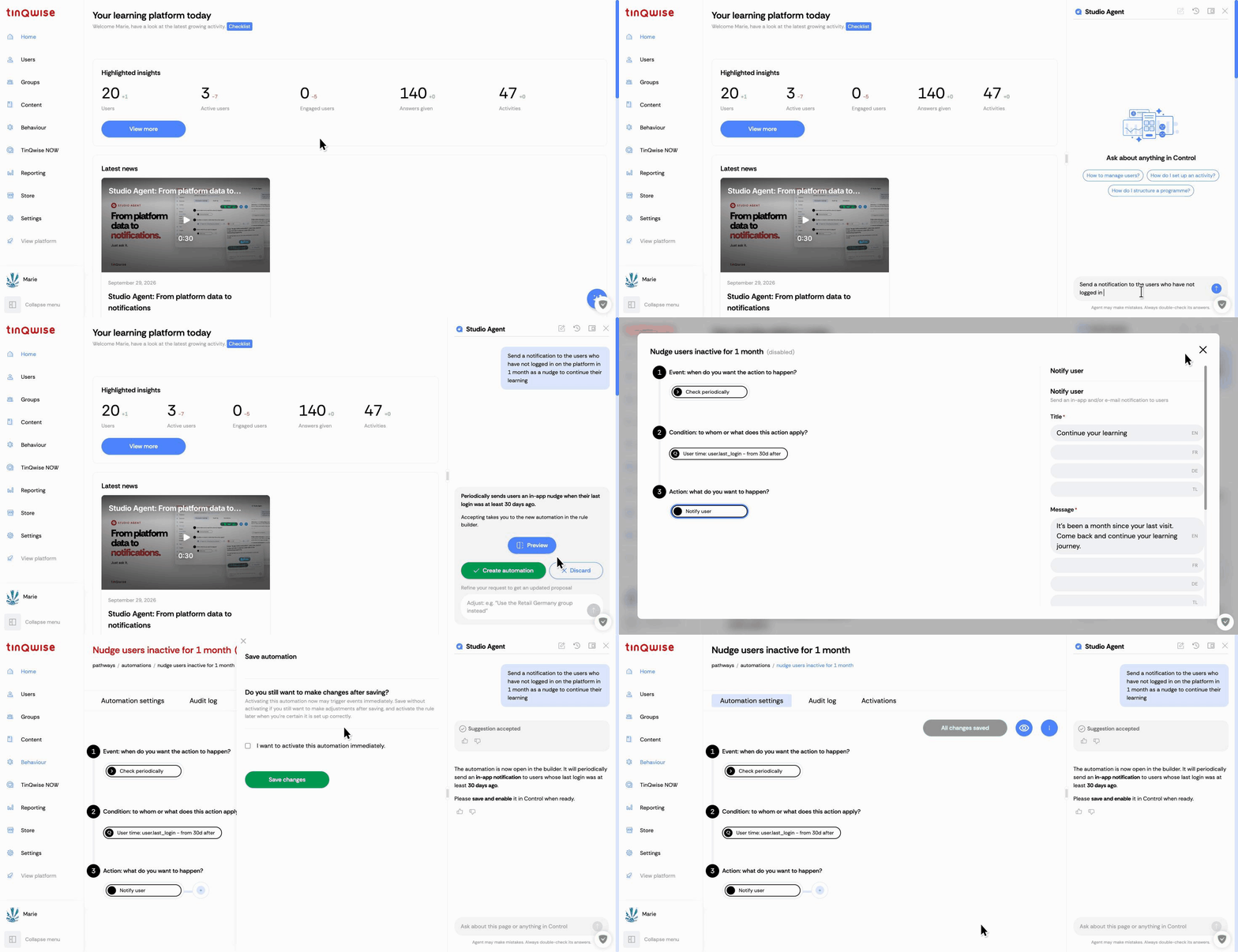 Studio Agent helps you automate the key moments in your training
Start with one moment
You don’t have to set everything up at once. Pick the moment where things go wrong most often. Is that week two? Start there. Which moment will you tackle first?
Already working with TinQwise? Ask your TinQwise contact to set it up with you.
Not a customer yet? Book a call. We’ll show you how it works, using your own onboarding as the example.

