

Creating e-learning doesn't have to take months. The best knowledge is already inside your organisation. And AI takes the heavy production work off your hands. What used to take weeks now takes a few days.
Take a new way of working at the distribution centre. Your best team leader knows exactly how it's done. It just isn't written down anywhere. And in three weeks, a hundred colleagues need to get started with it.
Your best knowledge is already in-house
Most knowledge lives in people's heads. In the presentation your product specialist gave last month. In the approach of the branch that tops the charts every month.
Bring that knowledge to the surface by getting your experts to help build. The best-performing branch shares its approach. Your product specialist turns a lunchtime talk into a five-minute lesson. You can also ask employees which three skills they've mastered best, and have them create a short lesson on each. That way, you fill your career paths with content from inside your own organisation.
And something else happens. Whoever teaches, learns too. Colleagues learn from each other, and knowledge no longer sits with just one person. A learning culture grows all by itself.
Create e-learning in four steps
1. Start with the goal
Good e-learning starts with three questions. What do you want to achieve? What do people need to do to get there? And why aren't they doing it yet? The answer to that last question shapes your e-learning. Missing knowledge? Then you explain. Missing practice? Then you let people practise. Next, write down concrete learning objectives: "After this learning bite, you can…"
2. Draw up an outline
Your outline is your blueprint. Which topics go in, and in what order? What do people learn online, and what do they practise at work? And when does someone earn a badge or certificate? A good outline keeps you in control. And it stops your project from spiralling.
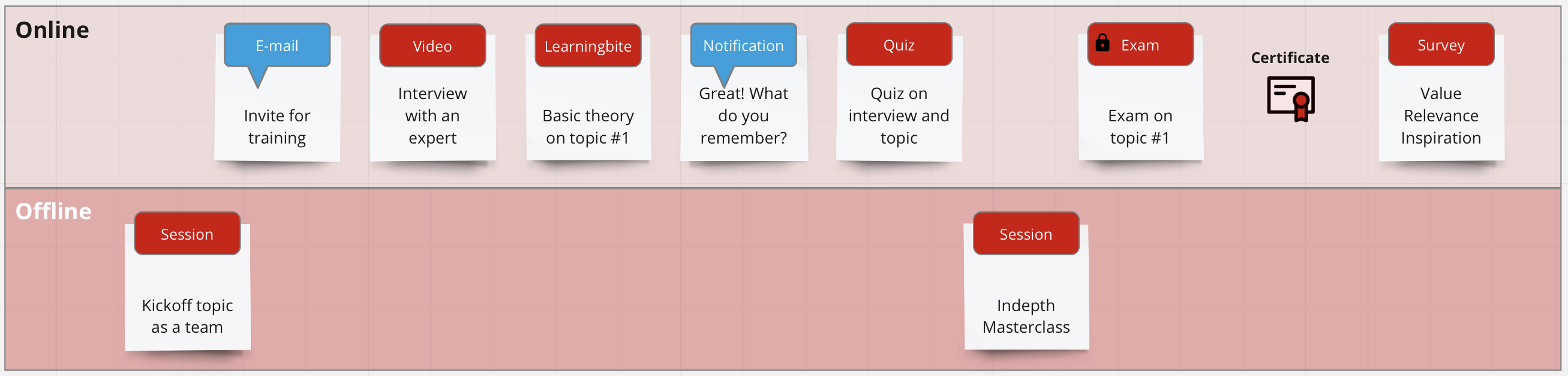
3. Choose a format and write for the screen
A question sparks more interest than a wall of text. Ask the question first, then reveal the answer. That gets people curious. Mix it up with a video, a slider or a short quiz.
Reading on a screen is harder than reading on paper. Keep your sentences short. Skip the capital letters, because online they feel like shouting. Choose images that serve the learning objective, and keep text out of your images.
4. Agree on the review up front
Feedback will always come. So agree in advance who reviews, how many rounds there are and who decides when feedback clashes. Otherwise you'll be stuck in endless ping-pong.
Let AI do the heavy lifting
Those four steps take a lot of time if you do everything yourself. That's where AI comes in. With Studio Agent, you upload what you already have: a briefing, a presentation or a work instruction. Studio Agent turns it into a learning bite. Too long? Ask for a shorter version. Need a different tone? Just say so. Translation into your teams' languages happens automatically.
That shifts the work. Setting the goal and guarding the quality remain human work. Those are steps 1 and 4. AI takes over most of the outline and production. Your team checks everything before it goes live. For campaigns it's even faster: from campaign PDF to training on the shop floor can happen in a single day.
And what you create doesn't end up gathering dust. Employees call it up through TinQwise NOW whenever they need it, right in the middle of their work.
PVH creates its own content
The store teams of Tommy Hilfiger and Calvin Klein across Europe learn through PVH Play. The platform has more than 7,500 users, over 4,000 of whom are active every month. Much of what they learn there, PVH now creates itself. The team builds new learning bites in-house, then rolls them out across its countries.
Your first learning bite is already on your desk
Grab the briefing, the presentation or the work instruction that landed in your inbox this week. Your first learning bite is already in there.
Curious how quickly you can turn a briefing into a learning bite? Try it yourself with Studio Agent.
Prefer some help with the design? Our learning specialists are happy to think along.

